FTDX1200 Operating Manual Page 73

TRANSMITTER CONVENIENCE FEATURES Cont'd

Previous Page    Index of Topics    Table of Contents    Index of Pages    Next Page

VOX (SSB/AM/FM MODES: AUTOMATIC RX/TX SWITCHING USING VOICE CONTROL)

Instead of using the microphone PTT switch or the front panel [MOX] switch to activate the transmitter, the VOX (Voice Operated TX/RX Control) system provides hands-free, automatic activation of the transmitter, based on voice input into the microphone.

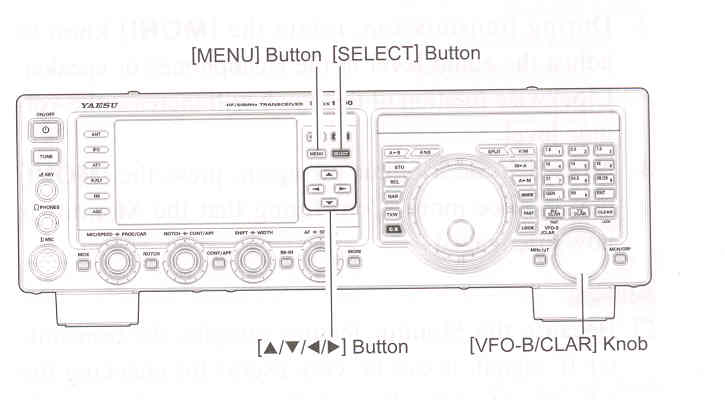
    1. Press the [◄ / ► / ▲ / ▼] button to select the "VOX", then press the [SELECT] button to select "ON". The "VOX" will appear in the display.

    2. Without pressing the PTT] switch, speak into the microphone in a normal voice level. When you start speaking, the transmitter should be activated automatically. When you finish speaking, the transceiver should return to the receive mode (after a short delay).

    3. To cancel VOX and return to PTT operation, press the [SELECT] once more. The "VOC" will turn off, signifying that the VOX circuitry has been turned off.

ADVICE:
The VOX Gain may be adjusted to prevent accidental transmitter activation in a noisy environment. To adjust the VOX Gain:

    1) Activate the VOX circuitry, if necessary.

    2) Press [MENU] button to engage the Menu mode.

    3) Rotate the [VFO-B/CLAR] knob (or press the ▲ / ▼ button) to select Menu item "181 VOX GAIN", then press the [SELECT] button.

    4) While speaking into the microphone, rotate the [VFO-B/CLAR] knob (or press the ▲ / ▼ button) to the point where the transmitter is quickly activated by your voice, without background noise causing the transmitter to activate.

    5) When you are satisfied with the setting, press the [SELECT] button, then press the [MENU] button to save the new setting and exit to normal operation.

The "Hang-Time" of the VOX system (the transmit/receive delay after the cessation of speech) may also be adjusted via the Menu mode. The default delay is 500 msec. To set a different delay time:

    1) Activate the VOX circuitry, if necessary.

    2) Press [MENU] button to engage the Menu mode.

    3) Rotate the [VFO-B/CLAR] knob (or press the ▲ / ▼ button) to select Menu item "182 VOX DELAY", then press the [SELECT] button.

    4) Rotate the [VFO-B/CLAR] knob while saying a brief syllable like "Ah" and listening to the hang time for the desired delay.

    5) When you are satisfied with the setting, press the [SELECT] button, then press the [MENU] button to save the new setting and exit to normal operation.


The Anti-Trip setting adjusts the level of negative receiver audio feedback to the microphone, to prevent receiver audio from activating the transmitter (via the microphone). This setting can also be adjusted via Menu item "183 ANTI VOX GAIN".

VOX operation may be engaged on either Voice modes, (SSB/AM/FM) or on AFSK-based Data modes. Use Menu item "180 VOX SELECT" (the selections are "MIC" and "DATA").


End of "VOX (SSB/AM/FM Modes: Automatic RX/TX Switching Using Voice Control)"

Cont'd Next Page "Transmitter Convenience Features"

Previous Page    Index of Topics    Table of Contents    Back to Top    Index of Pages    Next Page

FTDX1200 Operating Manual Page 73